Custom Software vs SaaS: Which Is Better for Your Business?
- 1Custom software is built around your specific business processes, while SaaS provides a ready-made solution for common business needs.
- 2SaaS usually has a lower upfront cost and faster implementation, while custom software offers greater control, flexibility, and long-term ownership.
- 3Custom software can be better for businesses with complex workflows, unique requirements, or plans to scale beyond the limitations of standard SaaS products.
- 4SaaS can be the better choice when you need a solution quickly, have standard requirements, or want the provider to handle maintenance and updates.
- 5The right choice depends on your budget, business requirements, scalability needs, data ownership, and long-term technology strategy.
Introduction
Choosing the right software can have a major impact on how efficiently your business operates and how easily it can grow. Many businesses eventually reach a point where spreadsheets, disconnected tools, or standard software no longer fit their day-to-day workflows. At that stage, two common options are custom software development and Software as a Service (SaaS).
The custom software vs SaaS decision usually comes down to how much control, flexibility, and scalability your business needs. SaaS products offer ready-to-use features, predictable subscription plans, and faster implementation, making them practical for businesses with standard requirements.
Custom software, on the other hand, is developed specifically around your business processes and requirements. It gives you greater control over features, integrations, data, and future development. This makes it particularly useful for businesses with complex workflows or requirements that standard SaaS products cannot fully address.
In this guide, we'll compare custom software vs SaaS across cost, ownership, scalability, customization, security, integrations, and long-term business value to help you choose the right approach for your business.
The Problem
Businesses often choose software based on the lowest upfront cost or the fastest implementation, without considering how well it will support their operations as they grow.
A SaaS platform may solve an immediate problem, but businesses can eventually face limitations such as restricted customization, recurring subscription costs, limited integrations, or workflows that don't match how their teams actually work.
Custom software solves a different problem. Instead of adapting the business to existing software, the software is designed around the business. However, it usually requires a higher initial investment, more planning, and ongoing responsibility for development and maintenance.
The challenge is therefore not simply choosing between custom software vs SaaS. It's about understanding which approach provides the right balance of cost, flexibility, ownership, scalability, security, and long-term business value for your specific requirements.
Why This Matters
Look beyond the initial price and consider subscriptions, implementation, customization, maintenance, and future upgrades.
Consider whether the software can adapt to your workflows or whether your team will need to change its processes.
Your software should be able to support increasing users, transactions, locations, and operational complexity.
Understand where your business data is stored, who controls it, and how easily you can access or migrate it.
Check whether the solution can connect with your existing CRM, ERP, payment gateways, APIs, communication tools, and other systems.
Your business requirements will change. The right software should allow you to add features and adapt without creating unnecessary technical limitations.
Custom Software vs SaaS: Detailed Comparison
| Factor | Custom Software | SaaS |
|---|---|---|
| Upfront Cost | Higher initial investment | Lower initial cost |
| Subscription Fees | No mandatory per-user SaaS subscription | Recurring monthly or annual fees |
| Customization | Built around your specific workflows | Limited to available features and customization options |
| Implementation | Requires planning, development, and testing | Usually quick to set up |
| Scalability | Can be designed around your long-term growth | Depends on the provider's plans and infrastructure |
| Data Ownership | Greater control over data and infrastructure | Data is hosted and managed within the provider's environment |
| Integrations | Can be developed for specific business systems and APIs | Limited to supported integrations |
| Maintenance | Your development team or software partner manages updates and maintenance | Provider generally handles maintenance and updates |
| Feature Control | You decide what features are built and prioritized | Features depend on the provider's roadmap |
| Best For | Businesses with unique workflows, complex requirements, or long-term scalability needs | Businesses with standard requirements that need a ready-to-use solution |
Custom Software: Pros & Cons
Pros
- ✓Built specifically around your business workflows and requirements.
- ✓Greater control over features, integrations, data, and future development.
- ✓Can scale with your business without depending on predefined software plans.
- ✓No mandatory per-user SaaS subscription fees.
- ✓Better suited for unique or complex operational processes.
Cons
- ✕Higher initial development investment.
- ✕Requires more planning and development time before launch.
- ✕Ongoing maintenance and technical support need to be managed.
SaaS: Pros & Cons
Pros
- ✓Lower upfront cost compared with building software from scratch.
- ✓Faster implementation and easier onboarding.
- ✓Provider generally handles hosting, maintenance, updates, and security infrastructure.
- ✓Suitable for businesses with standard and well-defined requirements.
Cons
- ✕Recurring subscription costs can increase as users and usage grow.
- ✕Customization may be limited to the provider's available options.
- ✕Your business may need to adapt its workflows to the software.
- ✕Features and integrations depend on the provider's capabilities and roadmap.
Real-world Case Study
Anime Paradise: Why a Custom Ecommerce Platform Made Sense
Anime Paradise needed more than a standard ecommerce storefront. The project required a custom buyer-facing shopping experience as well as a separate owner portal where products could be listed and managed.

Instead of relying on a ready-made ecommerce platform, we built the solution from the ground up using Next.js, Node.js, Express.js, and MySQL. The custom architecture gave the business greater control over its storefront, product management workflows, and future feature development.
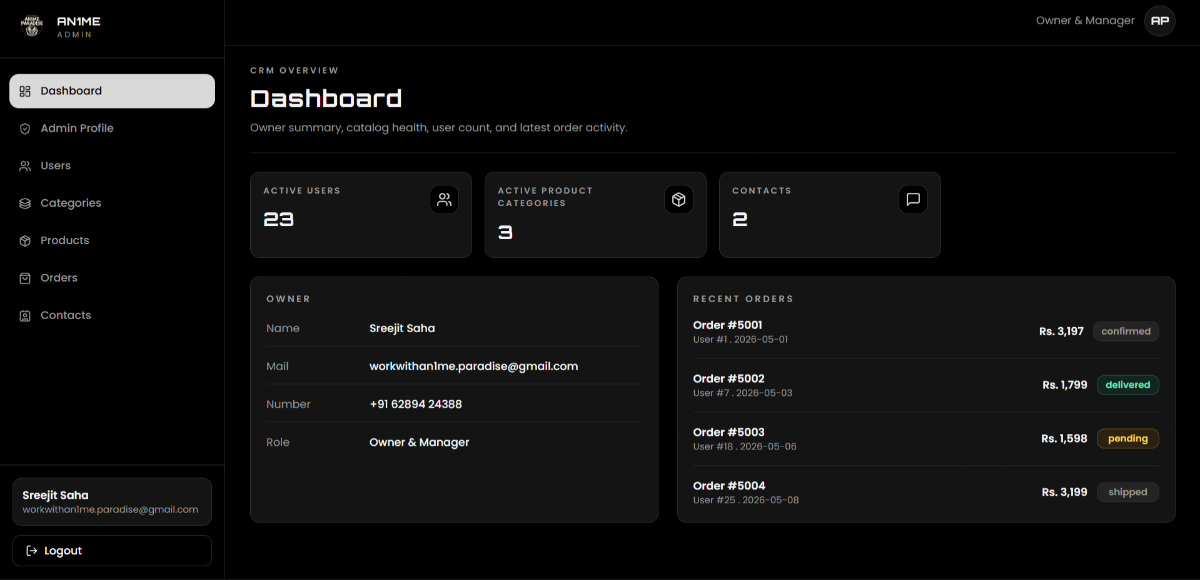
This example shows where custom software development can be valuable: when a business has specific workflows or product requirements that need more control than a standard SaaS platform can provide.
Common Mistakes When Choosing Custom Software vs SaaS
A lower initial price does not always mean a lower long-term cost. Consider subscription fees, user growth, customization, integrations, maintenance, and migration costs before making a decision.
Choosing software without mapping your actual workflows can create unnecessary manual work. Make sure the solution fits how your teams operate rather than focusing only on the feature list.
A solution that works for a small team may become restrictive as your users, locations, transactions, or operational requirements increase. Evaluate how the software can support future growth.
Your software may need to connect with payment gateways, CRMs, accounting systems, communication platforms, or internal APIs. Confirm integration capabilities before committing to a solution.
Understand where your business data is stored, how it can be exported, and what happens if you decide to change providers. This is especially important when relying on a SaaS platform for critical business operations.
Custom development can become unnecessarily expensive when requirements are unclear. Define core workflows, priorities, integrations, budget, and future requirements before development begins.
FAQs
Conclusion
There is no single answer to whether custom software vs SaaS is better. The right choice depends on your business requirements, budget, workflows, growth plans, integration needs, and how much control you need over your software and data.
SaaS can be the practical choice when you need a ready-to-use solution, quick implementation, and predictable subscription-based access. Custom software becomes more valuable when your business has unique workflows, complex requirements, specialized integrations, or long-term scalability needs.
Before making a decision, look beyond the initial price. Compare the total cost of ownership, customization, scalability, data ownership, integrations, maintenance, and future requirements. The goal is to choose software that supports your business rather than creating limitations as you grow.